One loader script
Goes in Custom JS under White Label in your agency settings. It covers the agency view and every sub-account.
Theme
Colour
Saved on this device only, and only if you accepted preference storage.
Theme
Colour
GHL Customizer · How it works
Everything is designed in the customizer with a live preview. You paste one script and one CSS import into GoHighLevel once, and from then on every change you save goes live on its own.
Beta · Free Free during beta, every feature included.
Why it matters
Snippets pasted from forums, each fixing one thing, none of them documented, and every change means editing agency settings again. The customizer replaces all of that with one loader that you never have to edit.
Stock GoHighLevel
With the GHL Customizer
Live preview
Screen sharing a client account? One click on the eye button blurs contact details. Try it on the sample dashboard below.
Loading the live preview
Arctic Clean Press the eye button at the right of the header, inside the preview, and names, emails and phone numbers blur. Press it again to bring them back.
The whole install
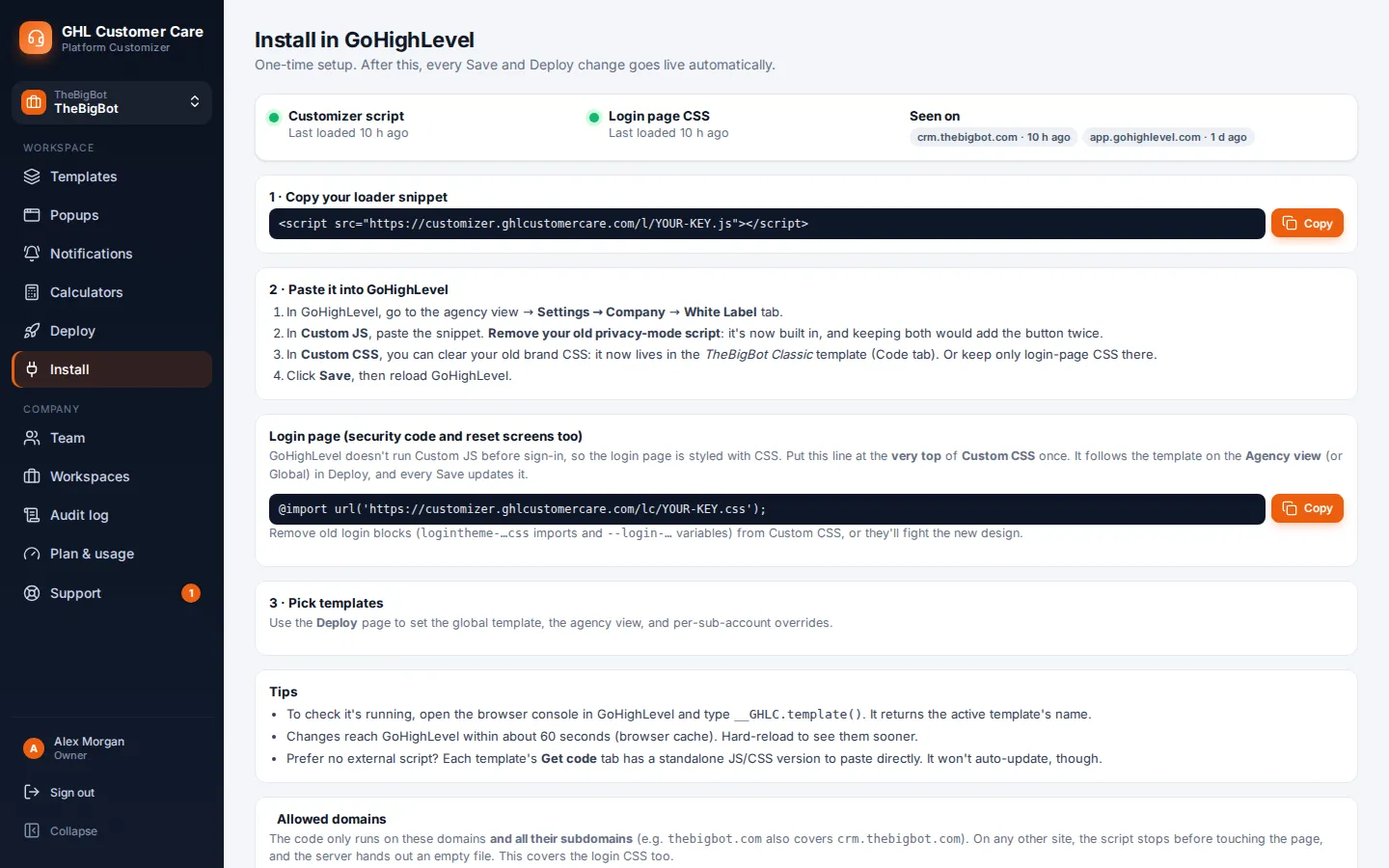
In GoHighLevel, open your agency settings and go to White Label. The script goes in Custom JS, the import goes in Custom CSS. The app gives you both lines with your own key already filled in.
<script src="https://customizer.ghlcustomercare.com/l/YOUR-KEY.js"></script>@import url("https://customizer.ghlcustomercare.com/lc/YOUR-KEY.css");What you get
Goes in Custom JS under White Label in your agency settings. It covers the agency view and every sub-account.
Goes in Custom CSS and styles the login page, which GoHighLevel shows before any script can run.
Blur contact details with one click when you share your screen, and hide the parts of GoHighLevel you do not want clients to reach.
Your script only runs on the domains you list, and requests from anywhere else are refused.
Every save is kept, with the last ten versions ready to restore in one click.
The customizer shows when your loader and login CSS were last seen working, so you know the install is live.
Screenshots
The install page, with both lines ready to copy
Deploy: pick a design per view or sub-account
Version history with one-click restore (sample versions)
How it works
Sign in, start from a theme and adjust colours, menus, login page and widgets with a live preview.
Copy the loader into GoHighLevel Custom JS and the import into Custom CSS. You do this once.
Save in the customizer and GoHighLevel picks up the new version on the next page load.
Questions
In GoHighLevel, open your agency settings and go to White Label. The loader script goes in Custom JS and the import goes in Custom CSS. The app gives you both lines with your key filled in.
No. The customizer changes how GoHighLevel looks and how its menus are laid out in the browser. Your data, workflows and settings stay exactly as they are.
Restore an earlier version from version history, or remove the two lines from GoHighLevel to go back to the stock look straight away.
It is one small script that is cached by the browser and only downloaded again when you save a change.
It adds an eye button to the header that blurs names, emails and phone numbers, which is handy for demos and screen sharing. It can also hide parts of GoHighLevel from clients.
Sign in, try how it works on your own brand and paste two lines into GoHighLevel. No card, no plans to pick.
Reading settings